Implementation · Braze CRM
Turning App Download into an Event Experience:
Braze Custom HTML IAM in Practice
A record of a non-developer marketer treating a campaign like a small product — first designing the state values, events, branches, and operational screens it needs, then finding what can be built within Braze's features. The story of turning app download from a “requirement” into a “way to participate.”
Before we begin
Not a developer's build log, but a marketer's design record
This isn't a front-end build log written by a developer. It's a record of how far a non-developer marketer can design a campaign experience inside a marketing tool called Braze, and where it was possible to trim down the development spec.
Writing great code was never the goal. The goal was to make app download — a heavy action — feel natural for the user to accept, and to leave the consent, participation, and result data generated along the way in a structure that an operator can reuse.
So what mattered in this project wasn't “I built some HTML.” It was the process of looking at a marketing campaign like a small product — first designing the state values, events, branches, and operational screens it needed — and then finding what could be built within Braze's features.
I learned what brazeBridge is and when Liquid is evaluated through the official docs and trial and error. So I wrote this article in an order that a marketer starting from the same line can follow step by step.
The start
“Grow our app users” — and of course, “same budget”
One of the missions that lands on a marketer or marketing team every quarter, every year, is “grow our app users.” Data often shows that users who go as far as downloading the app have high intent, and the service I was responsible for was no exception. The app is also an additional channel for prompting user behavior — though that, of course, requires marketing opt-in and push-notification consent.
And along with this mission comes a recurring constraint for the marketer: “same budget.” If the marketing budget stays flat but you have to grow app installs, where would you start?
The goal was to grow app users — a cohort with high retention and LTV. To move new and existing signed-up users that performance advertising alone can't reach, I designed app download itself as an “event participation experience” — a Braze Custom HTML IAM that flows from terms/marketing opt-in → drag-and-drop game → random reward. With no backend development, brazeBridge logged participation history and results; prize inventory was read and recorded via a GAS web app and Connected Content with a Google Spreadsheet as the ledger; and Canvas auto-branched messages by app-install / consent / participation / device-permission state. Download was the primary conversion, and opt-in was a second conversion embedded naturally in the participation flow.
Since this is a record of a marketer implementing it firsthand, code appears, but the flow stays readable even if you skip the code — under every code block I've written a one-line “what this code does.”
The tools that appear in this article — even if a term is new to you, this table is all you need.
| Tool | One-line description |
|---|---|
| Custom HTML IAM | An in-app message that displays a whole custom-built web screen (HTML/CSS/JS) instead of a fixed template |
| brazeBridge | The bridge between the screen inside the modal and Braze. It relays clicks and actions that happen in the modal back to Braze |
| Custom Attribute / Event | A per-user name tag (state) and action stamp (record). They become the raw material for segments and automation |
| Liquid | Template syntax that fills per-user values into blanks right before a message is sent |
| Connected Content | A feature that fetches the latest value (e.g. prize inventory) from an external URL at the moment the message is displayed |
| GAS + Spreadsheet | A combo that uses a Google Spreadsheet like a lightweight database and Google Apps Script like a lightweight server |
| Deep Link | A link that jumps straight to a specific screen in the app. It works for users who have the app installed |
| Deferred Deep Link | A link that sends users to the store if they don't have the app, then “defers” the move to the original destination on first launch after install |
The Custom Event and Custom Attribute names in this article (deeplink_open_promotion, is_participated_promotion_{event_id}, etc.) are all illustrative to aid understanding. Actual naming can be decided differently depending on your service environment.
What this article covers
- Purpose — we had to grow app users: converting to a channel with high retention and LTV
- Problem — performance alone wasn't enough: the need for app activation among new/existing signed-up users
- Question — how to connect app download to an “event participation experience”
- Campaign concept — Checkmate: drive download and link marketing opt-in into the participation flow
- Why a Custom HTML IAM was needed — handling participation, recording, and branching while minimizing the development spec
- The modal flow we built
- Recording user behavior with brazeBridge
- Canvas and automatic branching of follow-up messages
- Separating roles: Liquid · Connected Content · GAS · JavaScript
- Operational monitoring structure
- Seven challenges met while implementing (+ 11.5 the first flow vs. the actual flow · 11.6 the possible cases a user can hit)
- What I learned — extending the IAM into an interactive campaign interface for app activation and retention
Purpose
We had to grow app users — converting to a channel with high retention and LTV
Even the same user behaved differently afterward depending on which surface they used the service on. App users had a shorter revisit cycle than web users and a clearly higher number of core actions per person — the difference was distinct in both retention and LTV. In other words, app conversion wasn't just a channel switch; it was a conversion to a cohort with high retention and LTV.
On top of that comes the reach-channel problem. Web users simply have no push channel at all. App install and marketing opt-in may look like separate conversions, but from a CRM perspective they're a single goal — creating users you can reach, who come back repeatedly.
Problem
Performance alone wasn't enough
The foundation of any app-install campaign is performance advertising. But performance is a tool for generating new installs from external traffic, and it's inefficient for users who already know the service — users who signed up on the web but never installed the app, or who installed and then deleted it. These users aren't ones to win back by spending ad budget; they're ones you need to give a reason to move into the app within the touchpoints you already own (web, CRM channels).
To give the result up front: this judgment was right. This campaign's CPI relative to promotion cost was far lower than a typical performance install campaign.
Question
How to connect download to an “event participation experience”
A message that says “Install the app” gives the user no reason to act. Installing is a cost from the user's point of view, and the reward that offsets that cost has to be visible in the same spot.
So I flipped the question. Instead of prompting an app install, what if we created an experience you can only join by installing the app? If the event lives inside the app, installing becomes not a “requirement” but a “way to participate.” And by placing terms/marketing opt-in as a natural step within the participation flow, a second conversion — opt-in — follows the primary conversion of download.
The remaining question was the reward. Even when you give the same prize or the same points, how do you give it so the user likes it more? Give the same to everyone, give it by drawing, give it instantly, or give it later — this wasn't a question to answer by guessing. So I decided to ask users directly, and to do that I first built a Braze Custom HTML survey modal to collect reward preferences. (The design and implementation of that survey modal is covered in detail in a previous article.) Those responses led this campaign toward a “game-style random reward” concept — the immediacy of seeing the result right then and there was the reward experience users responded to most.
Campaign concept
Checkmate — download prompts and opt-in in one flow
Translating the direction the survey pointed to into a concept resulted in a chess-themed, game-style event. The user drags and drops a chess piece (the knight) onto the chessboard to complete the game, and checks the random reward result right there.
The conversion design has two layers.
- Primary conversion: app download/entry — the event is played in the app. For users without the app or who deleted it, a Deferred Deep Link (Airbridge) connects them straight from install into the event, reducing drop-off between install and event entry.
- Embedded conversion: marketing opt-in — the first step of participation is terms/opt-in. Consent is experienced not as a “sudden request” but as the “beginning of participation.”
The core value to deliver to the user was immediacy. We can't deliver the prize on the spot, but we can tell them the result on the spot. The experience that you can know your result right after you participate is the engine of a game-style event.
Why a Custom HTML IAM
Handling participation, recording, and branching while minimizing the development spec
To put it in one line first — I needed a way to handle “participation logging · one-time limit · result branching · inventory reflection” without a backend, and the answer was a Custom HTML IAM.
Distilling the requirements for building this concept, there were four.
Speed — it had to ship fast, with no development, or with the development spec minimized.
Repeatability — app-activation and opt-in promotions aren't one-offs. The same structure has to be applicable at other times and to other user cohorts, so it had to be in a form that's reusable.
Immediacy — showing the win result on the spot. For that, three things have to be recorded. (1) Whether the user has participated, so they participate only once; (2) the total quantity and depleted quantity per prize — so that when stock runs out, they're routed to a different result; (3) what each user won — to use in follow-up messaging. In other words, the “result on the spot” experience is only possible when a data structure of participation/inventory/win records backs it up. And there were no backend development resources to store all of that.
Operational visibility — the marketer has to be able to grasp the status of app conversion, participation, and consent, as well as prize depletion, in real time.
In the planning stage, I thought this flow was fairly simple. Maybe a few more Braze Canvas steps than usual? That was about the level I expected. But once I got into the actual design, it turned out each of the four requirements above demanded its own data structure and branching. It wasn't "a few more steps" — it was closer to a small product with state values and branches tangled together. So the crux came down to one thing — whether all this complexity could be held in a single vessel.
The answer that satisfied all four at once was a Custom HTML IAM. This doesn't mean the tool didn't matter — holding all this complexity in a single vessel ultimately depends on the tool's capabilities. But there was an order. I didn't pick the tool first; I first defined what to build and why, and then found the tool that fit. I looked at the campaign like a small product and first defined the state values (consent, participation, win), events (step-by-step behavior), branches (follow-up messages), and operational screen (status checking), then translated those into what could be built within Braze's features. The three records that immediacy required earlier were solved like this — participation status and win results are stored as Braze Custom Attributes/Events in place of a backend, and prize totals/depletion are read and recorded via a GAS web app with a Google Spreadsheet as the ledger. The screen flow is handled inside the HTML. A regular Braze In-App Message is enough for notices, banners, and simple CTAs, but it has limits for campaigns where the user acts through several steps inside the modal and the result has to be left behind as data again. The goal was to make the in-app message behave not as a simple banner for entering a landing page, but as one small campaign app.
This design existed first as documents, not in my head. I applied the artifacts that product development goes through directly to the campaign.
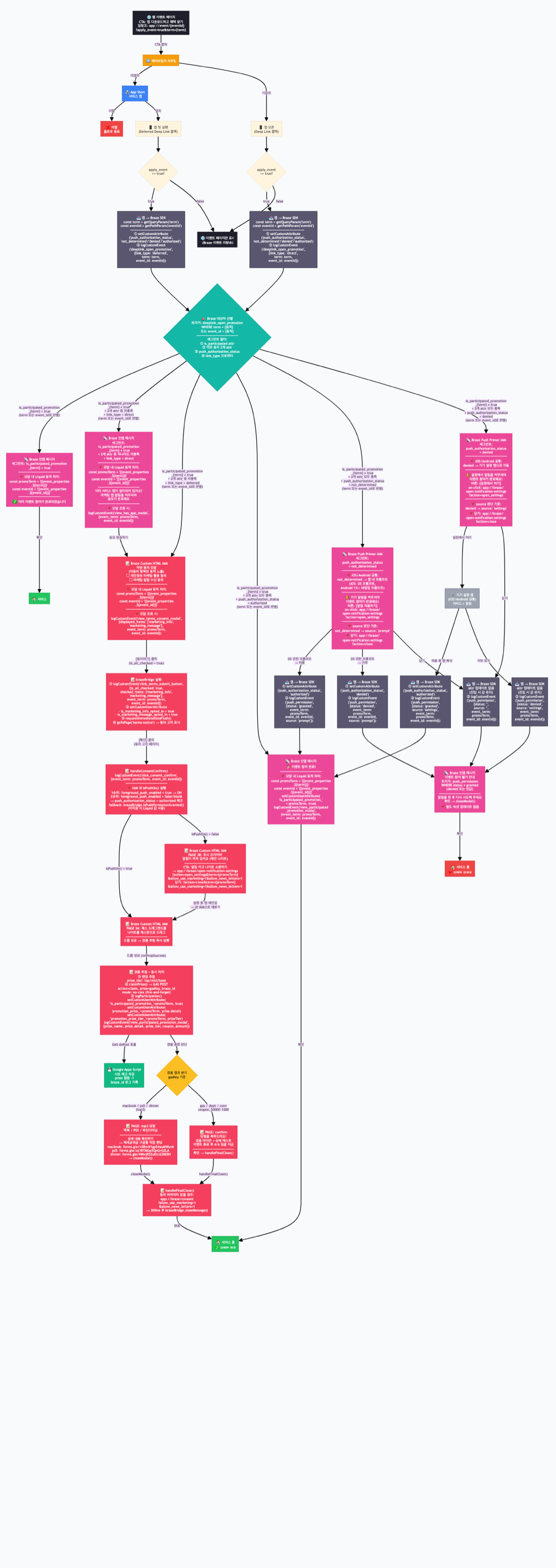
① User flowchart — the entire journey defined, from entry through branches A–E (by participation history, terms, push state) to the can't-participate cases
② Interactive prototype — a working mockup for stakeholder validation before implementation
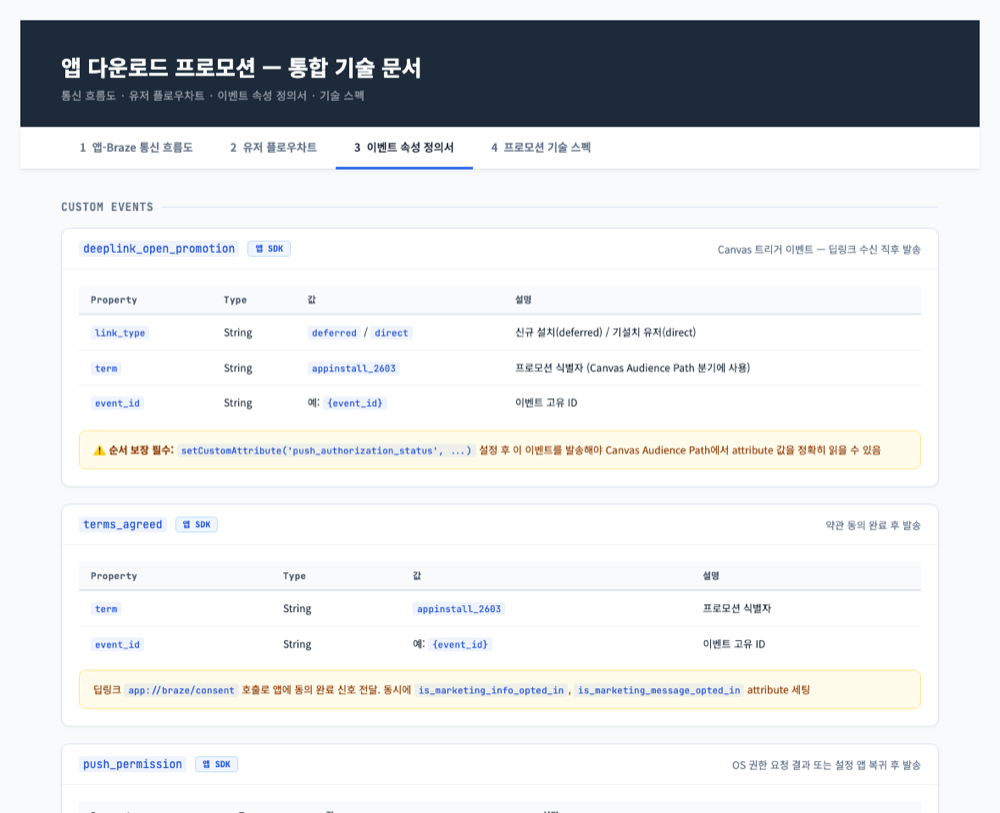
③ Integrated technical spec — an app–Braze communication flow diagram (PHASE 0–4), a per-event property definition sheet, and the Attribute→Event ordering-guarantee rule
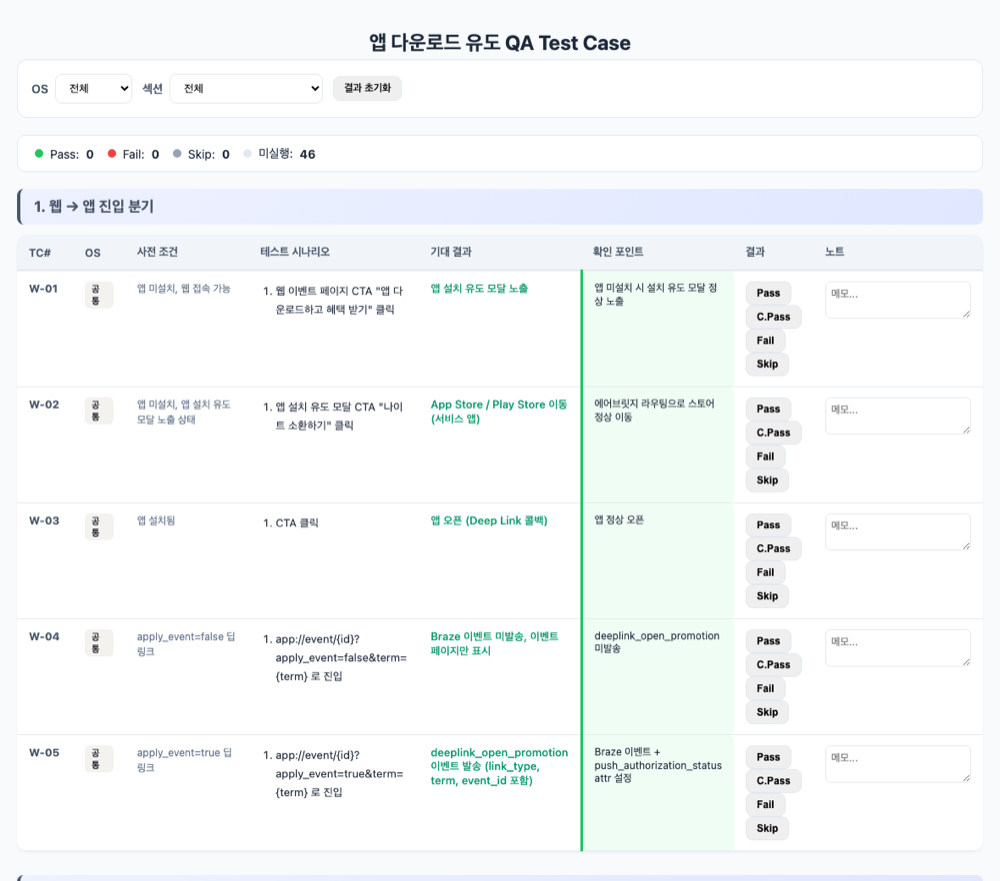
④ QA test cases — 46 cases by OS, in 7 sections (web→app entry / by terms×push combination / draw·result branching / duplicate participation / edge·regression)
↗ The 4 artifacts above are actual documents with sensitive information masked — click a preview to open the full document in a new tab.
Implementation · Modal flow
Switching between several screens inside one HTML
This IAM was designed as a structure that switches between several screens (pages) inside a single Custom HTML. Screens with a page-id are stacked on top of each other, and the goToPage() function changes only the active screen. From the user's standpoint, the experience is simple — install, consent, play, and see the result.
But before building the screens, there were questions to solve as a marketer first. For a user who tapped the event on the web, I had to send them to the store or open the app depending on whether they had the app, and then know whether the user who came in actually came through this event, and whether they hadn't already participated.
At first I assumed all three would be solved in roughly the same way. Something like, "checking user state — it's all probably similar." But once I dug in, each of the three reached into a completely different area — one the tool solved on its own, one I could build myself, and one had to pass through the dev team's hands. To state the conclusion first — the app-ownership branch was answered by the attribution tool (Airbridge), participation status by a Custom Attribute the marketer built directly, and the “opened via this event” signal by a Custom Event built together with the dev team (deeplink_open_promotion). The thinking that led to these answers is covered separately in Chapter 11, Challenges 1 and 2.
▌ goToPage()
function goToPage(id){
  document.querySelectorAll('.bz-page').forEach(function(p){
    p.classList.toggle('active', p.getAttribute('page-id') === id);
  });
}
→ What this code does: among the several screens hidden inside one HTML, it turns on only the one to show right now. This single function is the backbone of the multi-step flow.
Step 1. Prompting app download / app entry
The entry path for users without the app or who deleted it starts on the web. Tapping the CTA on the web event page (“Download the app and get rewards”) opens an install-prompt modal, and the modal's CTA (“Summon the knight”) sends them to the App Store / Play Store via Airbridge routing. On first launch after install, the Deferred Deep Link callback fires; for already-installed users, a Direct Deep Link fires — both take them straight into the event screen, because any navigation step wedged between install and event entry creates that much drop-off.
The moment the app opens, it sends a signal that says “this was opened via this event link” (deeplink_open_promotion). This signal plays two roles. One is the trigger that fires the event modal; the other is the dashboard that counts who came in. The signal carries a tag (link_type) that tells us whether this user came in by freshly installing the app (new install) or with the app already there (already installed). Thanks to that, a single signal lets us separate new-install inflow from existing-user revisits. (How this shared signal was used to distinguish multiple promotions is covered in Chapter 11, Challenge 2.)
That said, the same deep link doesn't always mean entering the event. A user might open it simply to view the event page. So I put a marker called apply_event on the deep link, and made the signal above fire only when that value is true. If it's false, the event page is shown but no Braze signal is sent — a device that splits “just looking” from “coming in to participate” right at the entrance.
Step 2. Terms / marketing opt-in
On the first screen of event participation, we collect consent for marketing use of personal data and consent to receive marketing notifications. Four operational details went in here.
First, items already consented to aren't shown. The user's existing consent state is injected via Liquid, and the checkboxes for items already consented to are hidden. For a user who has already consented to everything, the consent screen itself becomes a light, formal confirmation.
▌ Hide consented items (Liquid injection)
<span data-attr-marketing_info="{{custom_attribute.${is_marketing_info_opted_in}}}"></span>
<span data-attr-marketing_message="{{custom_attribute.${is_marketing_message_opted_in}}}"></span>
→ What this code does: before the message is displayed, Braze plants “which consents this user has already given” into the screen, and the JS reads those values to hide the already-consented checkboxes.
Second, record on consent immediately, and reflect it immediately. The moment the consent button is pressed, a Custom Attribute is recorded per consent item and sent straight to the server with requestImmediateDataFlush().
▌ Record consent · immediate flush
if(consentedItems.indexOf('marketing_info') !== -1)
  u.setCustomUserAttribute('is_marketing_info_opted_in', true);
if(consentedItems.indexOf('marketing_message') !== -1)
  u.setCustomUserAttribute('is_marketing_message_opted_in', true);
b.logCustomEvent('click_terms_submit_button', {checked_items: consentedItems.join(',')});
b.requestImmediateDataFlush();
→ What this code does: it tags which items were consented to, stamps the consent action, and then — without waiting — sends it to the Braze server immediately.
Third, notify the user of the consent. Right after consent completes, the flow passes through a notice screen that shows the consent date/time and the consented items in a table. For marketing opt-in, notice is as important as collection.
Fourth, record consent in two places at once. Marketing opt-in isn't just for sending Braze messages — it's a legal state value shared across the entire service, so recording it only in Braze would leave it out of sync with the service DB. So the moment the modal closes, the consented items are packed into a deep link and handed to the app, and the app uses those values to call the service-server API and reflect the consent in the DB too (the app↔server connection was designed together with the dev team). The reasoning behind why this handling was needed is covered in Chapter 11, Challenge 5.
▌ handleFinalClose() — consent sync
function handleFinalClose(){
  var params = buildConsentParams();  // list of consented items
  if(params.length > 0){
    window.location = '{APP_SCHEME}/consent?' + params.join('&');  // → app receives it and calls server API
  }
  setTimeout(closeModal, 300);  // close the modal a moment later
}
→ What this code does: right before the modal closes, it loads the consented items onto a deep link and hands them to the app. The app receives this signal and reports the consent state to the service server. The modal then closes.
Step 2.5. Push-state branch — the primer
After consent confirmation, the screen splits based on the user's app-push permission state. If permission is on, they go straight to the game; if it's off, they go to the push primer — a knight chained up, with a “Turn on alerts and summon the knight” button. This screen reframes the permission request not as a system pop-up but as game lore (“to free the knight, you need notifications”). (This branch wasn't in the original design and was added during implementation. Handling by permission state and how it was discovered are covered in Chapter 11, Challenge 4.)
The determination uses a priority order. The real-time permission check provided by brazeBridge is used first, and only in environments where that's not possible do we fall back to the send-time snapshot value injected via Liquid.
▌ Two-tier push-permission check
if(b && typeof b.isPushPermissionGranted === 'function'){
  if(b.isPushPermissionGranted()){ goToPage('chess-drop'); initDragDrop(); }
  else{ goToPage('push-primer'); }
} else if(isPushOn()){            // Liquid snapshot fallback
  goToPage('chess-drop'); initDragDrop();
} else {
  goToPage('push-primer');
}
→ What this code does: it asks the bridge directly whether push is on “at this very moment,” and if it can't ask, it judges by the value noted down when the message was sent. Since a user can change the setting while looking at the modal, the real-time value takes priority.
Step 3. The drag-and-drop game
The user drags and drops the knight into the drop zone on the chessboard. Drop it outside the zone and the knight bounces back to its spot; succeed and a landing animation plays as the draw begins. (Environment-specific issues during implementation are covered in Chapter 11.)
Step 4. Random reward result
When the game is completed, the draw result is decided on the spot, instantly, and shown to the user. (The specific draw logic is confidential and omitted.)
The win-result screen also splits by prize tier. High-value prizes lead to a dedicated screen connecting to an information-collection form; coupons/gift-voucher items show a “distributed in bulk after the event ends” notice screen. Whether stock is depleted is judged by the value fetched via Connected Content at the moment the modal is displayed — this structure is covered in detail in Chapter 9.
Implementation · Data recording
Recording user behavior with brazeBridge
To put it in one line first — Braze became the participation-record store in place of backend tables, and every action in the modal was left behind as data.
To sort out the division of recording duties first: app installs and deep-link conversions are measured by the attribution tool (Airbridge), while in-app participation behavior is recorded by brazeBridge. For each action that happens in the modal, I designed the recording method and the purpose of use up front.
| User action | Recording method | Purpose of use |
|---|---|---|
| App install / deep-link entry | Attribution tool (Airbridge) | Measure primary conversion (download) |
| Terms / opt-in | Custom Attribute (per item) | Store consent state, secure reach channel |
| Consent submit / confirm | Custom Event | Measure passing the consent step |
| Push-primer response | Custom Event (open/close) | Measure permission-request acceptance rate |
| Participation complete | Custom Attribute | One-time participation limit, prevent re-display |
| Win result | Custom Attribute + Event | Branch follow-up messages by prize |
| Prize decrement | GAS POST (sheet record) | Update inventory ledger |
Setting the recording units like this makes the whole campaign a funnel that flows install → entry → consent → interaction complete → result viewed. Since the drop-off at each step is measured, where users fall off becomes the hypothesis for the next experiment.
The “participate only once” limit is solved with the same structure. At the moment of participation completion, an event-specific Custom Attribute (is_participated_promotion_{event_id}) is recorded, and by setting that attribute as a Canvas branch condition and an IAM display-exclusion condition, re-participation is blocked without any separate server validation. The win detail (promotion_prize_{event_id}) is left behind too, used as-is for personalization in follow-up messages like “the ○○ you won.”
Summarizing the key Custom Attributes stored this way — what, in which type, recorded by whom, all at a glance. (All names are illustrative.)
| Attribute (example) | Type | Set by | Use |
|---|---|---|---|
| push_authorization_status | String | App SDK (on deep-link entry) | Push permission state (not_determined/denied/authorized) |
| is_marketing_info_opted_in | Boolean | brazeBridge (consent modal) | Consent for marketing use of personal data |
| is_marketing_message_opted_in | Boolean | brazeBridge (consent modal) | Consent to receive marketing notifications |
| is_participated_promotion_{event_id} | Boolean | brazeBridge (participation complete) | One-time participation limit, prevent re-display |
| promotion_prize_{event_id} | String | brazeBridge (participation complete) | Won prize — follow-up message personalization |
The key point is that the “set by” splits into two. Values the app SDK fills (permission state) and values brazeBridge fills inside the modal (consent, participation, win) coexist, and Canvas reads both together to branch.
Event and attribute recording was written considering both the real Braze environment and the local demo environment at once.
▌ logParticipation()
function getBridge(){ return window.brazeBridge || window.appboyBridge || null; }

function logParticipation(prize){
  var b = getBridge(); if(!b) return;
  b.getUser().setCustomUserAttribute('is_participated_promotion_' + promoTerm, true);
  b.getUser().setCustomUserAttribute('promotion_prize_' + promoTerm, prize.detail);
  b.logCustomEvent('view_participated_promotion_modal', {
    prize_name: prize.name
  });
  b.requestImmediateDataFlush();
}
→ What this code does: the moment participation ends, it attaches a “participated” name tag and a “won this” name tag, stamps the action, and sends it to the server immediately. This single record becomes the raw material for blocking re-participation and for branching follow-up messages.
Why requestImmediateDataFlush() matters — the SDK batches data and sends it on a fixed interval, but since a Canvas branch within the same session has to evaluate this attribute right away, it's sent immediately instead of waiting.
The “order” of recording was also a design target. When the app receives the deep link, I guaranteed that the push_authorization_status Attribute is set first, and only then is the deeplink_open_promotion event sent. Because Canvas wakes on this event and reads the Attribute value to branch, if the order were reversed it would send the wrong message based on the stale, pre-update permission value. As much as what to record, the order in which it's recorded determines the accuracy of automation.
Implementation · Canvas branching
Canvas and automatic branching of follow-up messages
To put it in one line first — branches decided at send time are handled by Canvas, and branches that change in real time inside the modal are handled by brazeBridge.
This IAM isn't a standalone campaign; it's one piece of a Canvas journey. The actual Canvas split users in the following order.
- Login / app-ownership branch — for users who aren't logged in or don't have the app, show a guidance message first instead of the event modal
- Participation-status branch — users who already participated are split into a duplicate-participation notice modal
- Consent state × device-permission state combination branch — different HTML variants are sent for each combination of whether the user completed all terms consents and whether app push (device notifications) is allowed. For example, the “existing user + terms unmet + device not allowed” combination gets a variant that starts from the consent screen, while the “all consented + device allowed” combination gets a variant that goes straight into the game

One design principle emerges here. Conditions already fixed before the user sees the modal (participation history, the send-time consent/permission state) are split in Canvas and segments, while conditions that can change while viewing the modal (push permission) are re-checked in real time inside the HTML via brazeBridge. Liquid values are a snapshot from send time, so they can't keep up with cases where the user changes a setting inside the modal and comes back.
Users who entered through a single shared trigger (deeplink_open_promotion) are split into five branches by segment conditions to show different IAMs. (The conditions are masked, generalized examples.)
| Branch | Segment condition (summary) | IAM shown |
|---|---|---|
| A. Already joined | is_participated_promotion = true | “Already participated” notice |
| B. Installed + terms unmet | not joined · consent incomplete · link_type = direct | Installed notice → consent modal |
| C. New + terms unmet | not joined · consent incomplete · link_type = deferred | Start from the consent modal |
| D. All consented + device allowed | not joined · consent complete · push on | Go straight into the game |
| E. All consented + device not allowed | not joined · consent complete · push off | Push primer → game |
This separation has two effects. A single HTML doesn't have to carry every case, so the code stays simple, and the performance of each variant message (which combination consents and participates) can be viewed separately at the Canvas-step level.
After participation ends, the attributes stored in Chapter 7 become the follow-up branch conditions as-is — reminders for non-participating users, and different follow-up messages for won/not-won users, all sent automatically.
Implementation · Separation of roles
Separating roles: Liquid · Connected Content · GAS · JavaScript
To put it in one line first — user values are handled by Liquid, operational values by Connected Content and GAS, and the screen by JavaScript. Then there's no need to redeploy code during campaign operation.
Liquid — injecting per-user snapshot values. Values that differ per user but are fixed at send time, like existing consent state, are injected via Liquid. Since Liquid is evaluated on the server before the HTML renders, it's more stable to use it only for value injection rather than complex conditional processing.
Connected Content — querying operational state. Connected Content is known as a personalization feature for fetching custom thumbnails or product-recommendation images, but its essence is broader — a feature that sends a request to an external URL at the moment the message renders and uses that response within the message. If the response is an image, it becomes thumbnail personalization; if it's JSON, it becomes real-time inventory lookup like this time. Values that keep changing during the campaign, like prize inventory, were fetched this way, and in this campaign that “external” was the GAS web app itself.
GAS + Spreadsheet — the inventory ledger and a lightweight API. The inventory per prize is written in a Google Spreadsheet, and the GAS web app receives two kinds of request. get returns the current inventory as JSON (called by Connected Content), and claim records the win into the sheet (called by the modal's JS). Lookup, recording, and the ledger are all solved without backend development.
▌ Connected Content — inventory lookup
{% connected_content https://script.google.com/macros/s/{GAS_WEBAPP_ID}/exec?action=get :save inv %}▌ Inject inventory value into the screen
<div id="ld" data-inv='{% if inv and inv.success %}{{ inv.inventory | json }}{% else %}{}{% endif %}'></div>→ What this code does: the moment the modal is displayed, Braze asks GAS “what's the inventory right now?” and plants the answer (JSON) into the screen. The JS reads that value to judge whether stock is depleted.
▌ claimPrize() — decrement inventory
function claimPrize(prizeName){
  fetch(GAS_WEBAPP_URL, {
    method: 'POST', mode: 'no-cors',
    body: JSON.stringify({ action: 'claim', prize: prizeName, braze_id: brazeId })
  });
}
→ What this code does: the moment a win is confirmed, the modal directly tells GAS “one of this prize went out” and writes a line into the sheet. That single line is both the inventory decrement and the winner record.
JavaScript — computation and screen rendering. The draw, page transitions, animations, and inventory judgment are all handled by JS.
The core effect of this separation is in operations. To adjust prize inventory or close it out, the marketer just changes the number in the spreadsheet. There's no need to edit the HTML or re-publish the campaign.
If the GAS web app URL is exposed externally, anyone can call it, so when publishing or sharing docs/code, always mask it and add request validation on the GAS side too, to be safe.
Operational monitoring
App conversion, participation rate, opt-in, and prize depletion at a glance
Once a campaign starts, there are four numbers a marketer needs. How much app conversion is happening, where the participation funnel leaks, how much consent is accumulating, and how many prizes are left.
App conversion — installs and deep-link entries are tracked at the campaign level on the attribution tool (Airbridge) dashboard.
Participation / consent status — if you build Braze segments based on the Custom Attributes/Events stored in Chapter 7, you can check the count of consented / participation-complete / winning users in real time in the segment builder. The performance of variant messages by consent×device-allow combination is captured separately at the Canvas-step level.
Prize-depletion status — the spreadsheet itself is the monitoring screen. Every time a claim request comes in, a win record piles up line by line in the sheet, so just by keeping the sheet open the marketer sees the depletion speed per prize in real time. Reducing inventory or closing it out is also done by changing a number in the same sheet — the ledger, the monitoring, and the ops console are unified into a single sheet.
Challenges
Seven challenges met while implementing
This campaign didn't start with a finished design. While building it, I met seven “wait, how do I do this?” moments in turn — from a question at the very start to a bug at the tail end of QA. Here they are in chronological order.
Challenge 1. How do I know whether this user installed/participated via this event?
The first thing I ran into was a measurement problem. Whether a user who tapped the event on the web came in by installing the app, whether that was through this event, and whether they hadn't already participated — I needed to know this to decide whether to show the modal, but at first there was no material for that judgment.
I solved it by splitting into three. App ownership was handled by the attribution tool's (Airbridge) deep-link routing. Participation status the marketer could solve directly — the “this user participated” marker (a Custom Attribute) is built directly in Braze, and you just turn it on the moment participation ends inside the modal. The problem was the “the app was opened via this event” signal. Since this is something the app side has to send the moment it opens, the marketer can't make it with Braze alone, so I asked the dev team to “send a signal whenever the app opens via this deep link” and designed it together. (If the service already has the same signal, you can just reuse it.) Drawing the line between what to do directly and where you need the dev team's help was also part of the design.
Challenge 2. “How do I tell which event this signal is for?”
Once I'd built the “app was opened” signal, the next question followed immediately. That signal name is the same one every download promotion uses (deeplink_open_promotion), so then how do I distinguish a user who came in through this chess event from one who came in through a different promotion? The signal alone couldn't tell “which promotion.”
The solution was to attach tags to the signal. I asked the dev team to load the promotion identifier (term) and the event number (event_id) onto the signal when sending it, and Braze used these tags to pick only “users who came in through this event” and show them the modal. The signal itself is shared, but thanks to the tags it splits cleanly per promotion. This was also a value the app sends, so it had to be decided together with the dev team.
Challenge 3. The hidden requirements that “result on the spot” dragged in
Next was immediacy. In the early design, immediacy was just a screen requirement at the level of “show the win result right away.” But once I actually started building, I realized that to make that one line hold, three invisible data requirements come along.
- Participation-count limit — if you give the result instantly, a user might try to re-draw by refreshing. To enforce one-time participation, participation status has to be recorded somewhere
- Prize total / depletion tracking — to confirm a win on the spot, you have to know whether that prize remains at that moment. If stock is gone, they have to be routed to a different result
- Per-user win record — to send the “distributed in bulk after the event” notice and follow-up messages, who won what has to remain on record
With a backend this would be done with a few tables, but those resources weren't there. So I split the storage — participation status and win results in Braze Custom Attributes (Chapter 7), and prize totals/depletion in a Google Spreadsheet as the ledger via GAS (Chapter 9). What looked like a screen requirement — “immediacy” — was actually a data-design problem.
Challenge 4. “What if they turn notifications off on the device?” — consent pops up first, right after install and before login
When implementation was nearly ripe, a question came from a developer. “What happens if the user has notifications turned off in their device settings?” The deeper I dug, the more the problem turned out to be in the order, more than the permission itself. A user who just installed the app is in a pre-login state, but with this flow, a screen asking for consent and permission pops up before they've even logged in. And since one of this campaign's goals was securing app-push consent, it got more tangled — for a user with notifications off at the OS level, push won't reach them even if you get their consent.
So I added a branch that checks the permission state right before the game (Chapter 6, Step 2.5). Instead of just popping up the system dialog, I handled the permission state in three branches.
- Never-asked user (
not_determined) → show the OS permission prompt right away - Already-denied user (
denied) → since the OS won't show the prompt again, guide them with a deep link to the settings screen - Already-allowed user (
authorized) → straight to the game
And I wrapped the permission request not in a dry “please turn on notifications,” but in game lore about freeing a chained knight. Whichever path, the result is recorded as a push_permission {status, source} signal, so I could even measure which path it was allowed through by whether source was prompt or settings. Allow and they go to the game; deny or close and they branch to a can't-participate notice. One unanticipated question ended up making the screen that most directly lifts the campaign's core goal (securing push consent).
Challenge 5. “I changed the Braze attribute, but how do I change the service DB?”
After collecting consent and even turning on the flag in Braze, I paused for a moment — wait, this way only Braze knows this user consented, while the service server (DB) doesn't, right? Marketing opt-in isn't used only when sending messages from Braze — it's a legal state value shared across the whole service, so if it changes only inside Braze, it goes out of sync with the service DB.
So the moment the modal closes, I made it pack which items were consented to onto a deep link and hand them to the app. The app receives those values and calls the API that reflects the consent state to the service server — this app↔server connection was designed together with the dev team. As a result, consent is left in two places at once. In Braze, by the modal directly (for targeting/segments); in the service DB, by the app that received the deep link, via the API (for the legal consent state). If only one side had been recorded, the consent state in one of the two places would have been false.
A later improvement — Braze straight to the server, bypassing the app. Initially, consent was synced as above via modal → deep link → app → server API. Since the structure had the modal hand a value to the app and the app call the server, the sync was only complete if the app received and processed that deep link. Later, as an API to send the consent state directly from Braze to the server was developed, it was simplified to reflect Braze → server in one go, without going through the app. The payload Braze sends looks roughly like this (values are illustrative).
▌ Braze → server consent-sync payload
{
  "userId": "{{${user_id}}}",   // user identifier injected via Braze Liquid
  "userRole": "customer",
  "eventSourceType": "braze",   // which path the consent came in through
  "term": "r-99999",            // promotion identifier (example)
  "allowNewsLetters": true,     // consent to receive marketing notifications
  "useMarketing": true          // consent for marketing use of personal data
}
→ What this code does: when consent happens, Braze sends this JSON directly to the service server, so the consent state in the service DB is updated even without the app's relay. The modal focuses only on collecting and recording consent, and the DB reflection is finished between Braze and the server.
Challenge 6. Drag doesn't work in Braze Preview
I thought I'd finished implementation and went into QA, but the piece (the knight) wouldn't move. It was fine locally, but in Braze Preview the drag didn't take. The code was the same yet it didn't work just because the environment changed — the most baffling kind of problem from a non-developer's standpoint. The cause was that touch events are handled differently in the Braze Web Preview environment versus a mobile WebView. In particular, the way global touchmove preventDefault was handled could conflict with the in-IAM interaction.
Direction of the fix:
- Remove the global
touchmove preventDefault - Apply
touch-action: noneonly to the drag-target element - Register mouse and touch events separately, but register the touch listener with
{passive:false}to block conflicts with screen scrolling during the drag
▌ Register drag events
knight.addEventListener('mousedown', onStart);
knight.addEventListener('touchstart', onStart, {passive:false});
document.addEventListener('touchmove', onMove, {passive:false});
→ What this code does: it connects the PC mouse and the mobile finger with the same drag logic, while preventing the screen from scrolling along during a drag on mobile.
For the record, the brazeBridge call itself was also environment-dependent. I added both a fallback that accepts the new and old bridge, and handling that initializes only after the bridge is ready.
▌ Wait for the bridge to be ready
function getBridge(){ return window.brazeBridge || window.appboyBridge || null; }

if(window.brazeBridge || window.appboyBridge) initTermsVisibility();
else window.addEventListener('ab.BridgeReady', initTermsVisibility);
→ What this code does: it uses whichever bridge exists, new (brazeBridge) or old (appboyBridge), and if the bridge isn't in place yet, it waits for the “ready” signal before starting.
Challenge 7. The send-time value and the real-time value differ
The last one was a timing problem. For values that can change even while the user is viewing the modal — like push permission — trusting only the snapshot stamped at send time (the Liquid-injected value) goes out of sync. As in showing the primer again to a user who turned the setting on in the push primer and came back.
The solution was a two-tier structure. I used brazeBridge's real-time permission check (isPushPermissionGranted) first, and judged by the send-time snapshot value only in environments where that doesn't work (see the Chapter 6, Step 2.5 code).
And — keeping the HTML from carrying everything
Solving the seven challenges, one principle naturally followed. If you handle terms, the game, the draw, permissions, and inventory all inside the HTML, the code quickly gets complicated. So I divided the roles — conditions fixed before send (participation history, the consent×device-allow combination) in Canvas/segments, inventory and win state injected via Connected Content (GAS), and the HTML focused only on screen transitions and real-time branching.
Flow comparison
The flow I first drew vs. the flow I actually built
The two flowcharts I'm about to show are a record of just how naively I thought about this campaign.
What's interesting is that the flowchart in the first plan and the final flowchart were quite different. The seven challenges made that difference.
The flow I first drew (the plan) — the picture in my head was a clean straight line.
Install/access the app via deep link → check participation status → check consent status → if consent complete, play chess → check the win result
I thought five boxes would do it.
The flow I actually built (final) — every time I solved a challenge, a branch sprouted.
Event click → (filter for “participation entry” only via apply_event) → app-ownership branch (new/already installed) → check participation history → check whether terms are met → push-permission state (3 kinds) branch → game → draw (inventory check) → result-screen branch → consent sync
Only after finishing did I realize — those five boxes in my head were the entire flowchart I pasted at the very front of this article as “Design artifact ①.” One line in the plan, a long scroll in reality. In campaigns, “I thought it'd be simple” almost always ends this way.
The reason is clear. “People who just looked vs. people who came to participate” (Challenge 1 · apply_event), “people who already participated” (Challenge 3), “people who haven't given terms consent yet” (the terms branch), “people with notifications off” (Challenge 4) — real users all come in with different states. The plan drew “one ideal user,” and the final version drew “users in every state that can come in.”
The possible cases
So, the cases a user can hit
Sorting out the cases that split by the user's state at entry time in the final flow looks like this. Two axes are the base — app ownership (new install / already installed) and state at entry (participation history · terms consent · push permission).
| # | User state | Path after entry |
|---|---|---|
| 1 | New · terms unmet · push allowed | Terms consent → game → result |
| 2 | New · terms unmet · push not allowed | Terms consent → push primer → (allow) game / (deny) can't participate |
| 3 | New · terms met · push allowed | Straight to game → result |
| 4 | New · terms met · push not allowed | Push primer → (allow) game / (deny) can't participate |
| 5 | Installed · terms unmet · push allowed | Installed notice → terms consent → game → result |
| 6 | Installed · terms unmet · push not allowed | Installed notice → terms consent → push primer → (allow) game / (deny) can't participate |
| 7 | Installed · terms met · push allowed | Straight to game → result |
| 8 | Installed · terms met · push not allowed | Push primer → (allow) game / (deny) can't participate |
| 9 | (common) Already-participated user | Split into an “already participated” notice |
That's nine entry branches alone. On top of that, the push-not-allowed paths (2·4·6·8) split once more into “never-asked users” and “already-denied users” (two of the three permission states), and once you add the post-game draw result (the screen by win tier, stock depletion), the screen combinations a user can actually hit grow further.
What the first plan drew was just one of these paths — number 3 or 7 (the ideal user who already meets both terms and push). The other eight branches were the real users that surfaced one by one as I built.
What I learned
Extending the IAM into an interactive campaign interface
A Braze Custom HTML IAM isn't just a feature for making pretty modals. Designed well, it can extend a CRM campaign to the next level.
- You can make users act directly inside the message,
- store that action as Braze data instantly,
- and based on the stored data, automatically branch the next message in Canvas.
In this campaign, the IAM was not a message but a conversion device. The primary conversion of app download and the embedded conversion of marketing opt-in happened together within a single participation flow, and as a result, it wasn't just install counts that grew but users you can reach who come back repeatedly.
And this structure isn't a one-off. The skeleton of consent → interaction → result → follow-up branching, and the role-separated Liquid · Connected Content · GAS · JS structure, can be reused in the next campaign by swapping only the content. The more repetitive the campaign — like app activation — the more this reusability becomes operational efficiency.
In other words, you can extend a CRM message from a simple send channel into an interactive campaign interface that collects user behavior and designs the next action.
What mattered most wasn't reducing dependence on developers, but that the marketer understood and designed the campaign logic and data flow firsthand.
As I said at the start, the heart of this record isn't “a non-developer built some HTML” — it's that if you look at a campaign like a small product and design the state values, events, branches, and operational screens first, the implementation follows within your marketing tool. Combine Custom HTML, Liquid, brazeBridge, and Canvas, and even a CRM marketer can go beyond running simple messages to create a product-style campaign experience. And this isn't something that requires a special technical background. Any marketer who can define the state values and branches a campaign needs can build the same structure within the tools they already use.
One last thing I want to add. This article covered what you can do with Braze, but what I really want to say isn't about the tool. Whether you reduce development dependency with Braze, have a developer build it quickly, or use another tool entirely — that's a matter of means. What doesn't change is that the marketer has to first define what to build, why, and which problem it solves. The tool is just the vessel that carries that definition into reality, and the vessel can change. So what this record wants to leave behind isn't "how to use Braze," but a way of designing a campaign from its problem and purpose.
FAQ
Frequently asked questions
Q1. What should I check when brazeBridge isn't working?
Check the environment first. window.brazeBridge is only injected in an actual IAM display environment; it isn't present in a local browser or some Preview environments. On older SDK environments it may exist as appboyBridge, so handle both cases with a fallback function (the getBridge pattern). Hook your initialization code to run after the ab.BridgeReady event. If it still doesn't work, verify your SDK version and the IAM type (whether it's Custom HTML).
Q2. I recorded a Custom Attribute, but it isn't reflected in my segment / Canvas branch right away.
The SDK batches data and sends it to the server on a fixed interval. If you need an immediate downstream branch within the same session, call requestImmediateDataFlush() right after writing the attribute. If a timing issue still remains at the branch point, adding a delay step before the branch-condition evaluation is another option.
Q3. Is managing prize inventory really possible without a backend?
Yes. Use a Google Spreadsheet as your inventory ledger and build read (get) and write (claim) endpoints with a GAS web app. Connected Content calls the read endpoint at message render time, and the modal's JS POSTs to the write endpoint the moment a win is confirmed. Just be careful about exposing the web app URL and about request validation, and if it's a campaign with heavy per-second traffic, check GAS processing limits in advance.
Q4. How do I connect events from a promotional IAM to funnel analysis?
If you record each step inside the modal as a separate Custom Event (impression → consent → interaction complete → result viewed), that alone becomes a mini-funnel you can query in your funnel-analysis tool. The key is to design the events for “measuring step-by-step drop-off,” not for “tallying results.” Which step has the biggest drop-off becomes the hypothesis for your next A/B test (impression-trigger timing, interaction difficulty, reward wording, and so on).
Q5. When should I use a Custom HTML IAM instead of a regular IAM?
If a single message plus a simple CTA is enough, a regular IAM is better — it's lighter and more stable to operate. You need Custom HTML in one of three cases: (1) when you have to collect user responses inside the modal as structured data, (2) when a multi-step flow (consent → interaction → result) has to be handled inside one modal, or (3) when the screen itself needs to change based on per-user data (Liquid) or operational state (Connected Content).